
DB2 Replication Guide and Reference
The Tools Settings notebook contains default preferences for the DB2
Universal Database administration tools. You can set replication
default values on the Replication page of the notebook, as shown in Figure 14. These default values are used for all replication
activities administered by the Control Center.
Figure 14. The Replication Page of the Tools Setting Notebook. The Replication page of the Tools Settings notebook contains default preferences for replication.
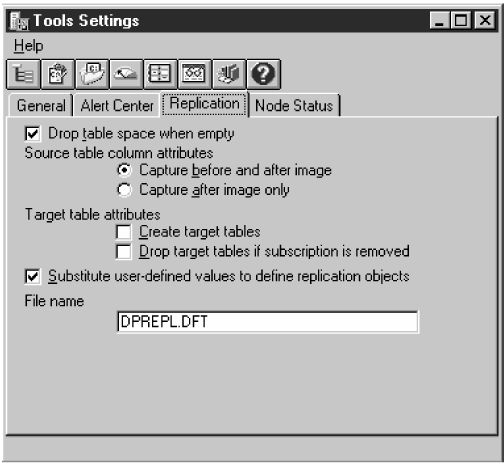
The default values for replication sources and subscriptions are:
- Table spaces
- Change data table and target table spaces are dropped when
empty.
- Replication sources
- Before- and after-image columns are captured.
- Replication targets
-
- Target tables must be created by the user.
- Target tables are not dropped if the subscription is removed.
To set replication preferences in the Tools Settings
notebook:
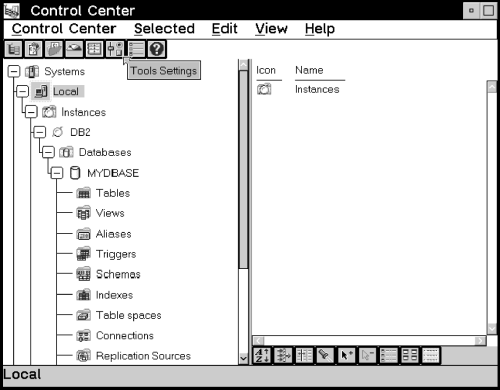
- From the Control Center, select the Tools Settings icon in the
tool bar as shown in Figure 15.
Figure 15. The Tools Settings icon. The Tools Setting icon opens the Tools Setting window where you can set replication preferences.
The Tools Settings notebook opens.
- Click on the Replication tab to open the Replication
page.
- If you want both the table space for the change data table (at the source
server) and the table space for the target table (at the target server) to be
dropped when the table space is empty, select the Table spaces are
dropped when empty check box.
When selected, table spaces are dropped for the specified table types on
MVS, OS/2, Windows NT or 95, AIX, HP-UX, Solaris, UnixWare 7, VSE, and VM.
- For capturing before- and after-image columns on the replication source,
select a radio button:
- Capture before and after image
- The before-image and after-image of the source table column are captured
and can be replicated to a target table. The before- and after-image
columns will have the following values in the target table depending on the
type of change made to the source column:
- Insert
- The before-image column has a NULL value.
- Delete
- Both the before- and after-image columns contain the before-image
value.
- Update
- Column values before the change are captured in the before-image columns;
values after the change are in the after-image columns.
When the target table is initialized (or full refreshed due to a Capture
program cold start), before-image columns have NULL values.
- Capture after image only
- Only the after image of the source table column is captured and can be
replicated to a target table.
- If you want the Control Center to create the target table automatically
while defining a replication subscription, select the Create target
tables check box. If the target table is not selected, you need
to create your own target table. See Defining a Replication Subscription with a User-Defined Target Table for more information about defining and maintaining target
tables.
- If you want to drop affected target table and related control tables when
the replication subscription set is removed, select the Drop target
tables if subscription is removed check box.
- Close the Tool Settings notebook to save your changes.
[ Top of Page | Previous Page | Next Page | Table of Contents | Index ]
[ DB2 List of Books |
Search the DB2 Books ]