
You can access your replication sources and targets through the Control Center interface. There are three containers in the Control Center for organizing the objects that you use to set up and maintain your replication environment:
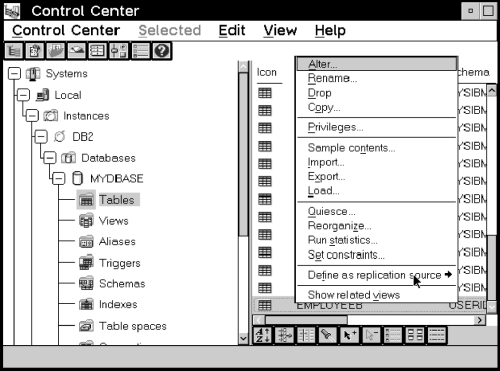
Figure 13 shows the Control Center. The folders you use for replication tasks are in the tree structure on the left side of the window, called the object tree.
Figure 13. The Replication Folder Objects in the Control Center Window. The Replication folder objects are used to administer your replication environment.
Each object also has a menu with the actions that can be performed with the object. In Figure 13, a table object has been selected and the pop-up menu is displayed with the Define as replication source action selected.
To access the replication folders and objects:
In addition, some actions can be performed against an entire folder. For example, you can refresh the Replication Sources folder.
If you are connecting to a DB2 for MVS, DB2 for VSE, or DB2 for VM source or target database server from the Control Center, you must bind the database to the Control Center.
To bind the database:
DB2 BIND @DDCSxxx.LST ISOLATION UR BLOCKING ALL SQLERROR CONTINUE
Where UR specifies the list in uncommitted read format for greater performance and xxx specifies the platform name: MVS, VSE, or VM.
Additionally, you might need to perform an explicit connect from the Control Center. If the password is different than the local logon ID and password at the Control Center workstation, it is recommended that you explicitly connect to the database server using the Connect menu choice from the pop-up menu for the icon of your DB2 for MVS database.