
This section deals with using JDBC and Java to access data from your DB2 databases. For information on SQLJ, refer to "Embedded SQL for Java (SQLJ) Programming".
DB2 together with JDBC provides support for:
This section describes how to access DB2 databases using JDBC. The specific topics discussed are:
You can use DB2's JDBC support to build both:
If your application or applet uses JDBC, you need to familiarize yourself with the JDBC specification, JDBC: A Java SQL API, available from Sun Microsystems. This specification describes how to call JDBC APIs to access a database and manipulate data in that database.
You should also read through this section to learn about DB2's extensions to JDBC and its few limitations (refer to "Extensions"). If you plan to create UDFs or stored procedures in Java, refer to "Creating and Using Java User-Defined Functions" and "Creating and Using Java Stored Procedures", as there are considerations that are different for Java than for other languages.
To help you begin coding your program, sample applications and applets are provided in the sqllib/samples/java directory. (All instances of sqllib/samples/java in this book also refer to the %DB2PATH%\samples\java directory on Windows and OS/2, where %DB2PATH% is the path where DB2 is installed.) If you have created the SAMPLE database, you can also run the samples. See the SQL Reference for information about the SAMPLE database.
There are two independent components to DB2's Java enablement:
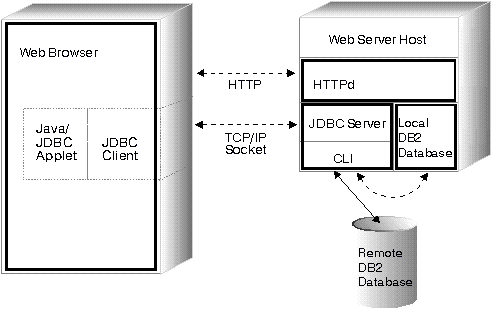
Figure 1 illustrates how the JDBC applet driver works. The driver consists of a JDBC client and a JDBC server. The JDBC client driver is loaded on the Web browser along with the applet. When a connection to a DB2 database is requested by the applet, the client opens a TCP/IP socket to the JDBC server on the machine where the Web server is running. After a connection is set up, the client sends each of the subsequent database access requests from the applet to the JDBC server though the TCP/IP connection. The JDBC server then makes corresponding CLI (ODBC) calls to perform the task. Upon completion, the JDBC server sends the results back to the client through the connection.
Figure 1. DB2's JDBC Applet Implementation
|
Figure 2 illustrates how a DB2 JDBC application works. You can think of a DB2 JDBC application as a DB2 CLI application, only you write it using the Java language. Calls to JDBC are translated to calls to DB2 CLI, through Java native methods. This dependency requires that the DB2 CAE component be installed at the client. A JDBC request flows through DB2 CLI to the DB2 server through the normal CAE communication flow.
Figure 2. DB2's JDBC Application Implementation
 |
Writing a Java JDBC application or applet is very similar to writing a C application using DB2 CLI or ODBC to access the database. The primary difference between applications and applets is that an application requires the DB2 CAE to be installed on the client, and uses the CAE to communicate with DB2; the applet depends on a Java-enabled Web browser, and does not require any DB2 code installed on the client.
You need to treat applets differently than applications, as applets are delivered over the network (intranet or Internet). You must install the DB2 server or client on the same machine as your Web server. The JDBC applet and application support is installed as part of DB2.
Creating Java UDFs and stored procedures is very similar to creating UDFs and stored procedures in other supported programming languages. Once you have created and registered them, you can call them from programs in any language. Typically, you may call JDBC APIs from your stored procedures, but you can not call them from UDFs.
| Note: | DB2 does not support Java stored procedures and Java user-defined functions (UDFs) accessing DB2 databases on HP-UX and SCO UnixWare servers. |
To run your UDFs and stored procedures, DB2 calls the Java interpreter on the server. DB2 does not include a Java interpreter; your database administrator must install and configure the appropriate Java Development Kit (JDK) on your DB2 server before starting up the database.
The runtime libraries for the Java interpreter must be available in the system search paths (PATH or LIBPATH or LD_LIBRARY_PATH, and CLASSPATH). For more information on setting up the Java environment on OS/2 and Windows, see Appendix D. "Building Applications for Windows and OS/2 Environments Updates". For more information on setting up the Java environment on UNIX platforms see Building Applications for UNIX Environments.
DB2 loads or starts the Java interpreter on the first call to a Java UDF or stored procedure (see "Creating and Using Java User-Defined Functions" or "Creating and Using Java Stored Procedures"). For unfenced UDFs and stored procedures, DB2 loads one Java interpreter per database instance, and runs it inside the database engine's address space for best performance. For fenced UDFs, DB2 uses a distinct interpreter inside the db2udf process; similarly, fenced stored procedures use a distinct interpreter inside the db2dari process. In all cases, the Java interpreter stays loaded until the embedding process ends.
Whether you're writing an application or applet, you would typically call JDBC APIs to:
After coding your program, compile it as you would any other Java program. You don't need to perform any special precompile or bind steps.
Like other Java applets, you distribute your JDBC applet over the network (intranet or Internet). Typically you would imbed the applet in a hypertext markup language (HTML) page. For example, to call the sample applet DB2Applt.java, (provided in sqllib/samples/java) you might use the tag:
<applet code="DB2Applt.class" width=325 height=275 archive="db2java.zip">
To run your applet, you need only a Java-enabled Web browser on the client machine. When you load your HTML page, the applet tag downloads the Java applet to your machine which then downloads the Java class files, including the COM.ibm.db2.jdbc.net class which is DB2's JDBC driver. When your applet calls the JDBC API to connect to DB2, the JDBC driver establishes separate communications with the DB2 database through the JDBC applet server residing on the Web server.
For your applets to run, you need to ensure that the correct files are installed in the proper places, as follows:
db2jstrt portno
where portno is an unused TCP/IP port number that applets can use.
Distribute your JDBC application as you would any other Java application. As the application uses DB2's CAE to communicate with the DB2 server, you have no special security concerns; authority verification is performed by the CAE.
To run your application on a client machine, you must also have installed on that machine:
Start your application from the GUI or command line, like any other application.
A sample application, DB2Appl.java, is provided in the sqllib/samples/java directory. If you have created the SAMPLE database, you can also run the sample by adding samples/java/samples.zip to your CLASSPATH environment variable, changing to the sqllib/samples/java directory, and entering the following command:
java DB2Appl
See the SQL Reference for information on the SAMPLE database.
DB2 Universal Database supports the JDK Version 1.1 JDBC specification. You may have to modify applications and applets that are written to the JDBC Version 1.0 to work properly with DB2 Version 5.
There are also special considerations for graphical and large objects (LOBs).
The JDBC specification does not explicitly mention large objects (LOBs) or graphic types.
Treat LOBs as the corresponding LONGVAR type. Because LOB types are declared in SQL with a maximum length, ensure that you do not return arrays or strings longer than the declared limit. This consideration applies to SQL string types as well.
For GRAPHIC and DBCLOB types, treat them as the corresponding CHAR types. The following JDBC APIs behave as described below:
| Notes: |
Along with supporting client-side Java code, DB2 also supports creating user-defined functions (UDF) and stored procedures in Java that reside on the server. This Java support does not alter the support for UDFs and stored procedures in other programming languages.
UDFs and stored procedures written in Java provide the same capability as existing UDFs and stored procedures; they are simply methods in Java classes. Once you create and register these UDFs and stored procedures, place the Java classes in the correct file location, described in "Where to Put Java Classes". You can then call them from a program in any language. DB2 calls the Java interpreter to run them; they run as if they are a part of a Java application, and therefore are not subject to applet security restrictions.
DB2 handles type conversion (see "Mapping Between SQL Types and Java Objects") between SQL types and Java objects for you, as it does for other programming languages. Because SQL string and LOB types are declared in SQL with a maximum length, ensure that your Java methods do not return arrays or strings that are longer than the declared limit. DB2 detects many possible errors in data conversion and signals them by throwing an exception.
Because you can overload Java methods, two methods with the same name but different argument lists can coexist in the same Java class. Make sure that your Java methods that implement UDFs and stored procedures have the exact signature expected, that is, the list of formal arguments and the method name.
When you call UDFs and stored procedures that are implemented as Java methods, DB2 converts SQL types to and from Java types for you as described in Table 9. Several of these classes are provided in the Java package COM.ibm.db2.app.
Table 9. DB2 SQL Types and Java Objects
| SQL Type | Java Type (UDF) | Java Type (Stored Procedure) | ||
|---|---|---|---|---|
| SMALLINT (500/501) | short | short | ||
| INTEGER (496/497) | Int | Int | ||
| BIGINT (492/493) | long | long | ||
| FLOAT (480/481) | double | double | ||
| REAL (480/481)1 | float | float | ||
| DECIMAL(p,s) (484/485) | BigDecimal | BigDecimal | ||
| NUMERIC(p,s) (504/505) | BigDecimal | BigDecimal | ||
| CHAR(n) (452/453) | String | String | ||
| CHAR(n) FOR BIT DATA (452/453) | Blob | Blob | ||
| C null-terminated string (400/401)2 | n/a | String | ||
| VARCHAR(n)(448/449) | String | String | ||
| VARCHAR(n) FOR BIT DATA (448/449) | Blob | Blob | ||
| LONG VARCHAR (456/457) | Clob | Clob | ||
| LONG VARCHAR FOR BIT DATA (456/457) | Blob | Blob | ||
| GRAPHIC(n) (468/469) | String | String | ||
| C null-terminated graphic string (460/461)2 | n/a | String | ||
| VARGRAPHIC(n) (464/465) | String | String | ||
| LONG VARGRAPHIC (472/473)3 | Clob | Clob | ||
| BLOB(n)(404/405)3 | Blob | Blob | ||
| CLOB(n) (408/409)3 | Clob | Clob | ||
| DBCLOB(n) (412/413)3 | Clob | Clob | ||
| DATE (384/385)4 | String | String | ||
| TIME (388/389)4 | String | String | ||
| TIMESTAMP (392/393)4 | String | String | ||
| ||||
Instances of classes COM.ibm.db2.app.Blob and COM.ibm.db2.app.Clob represent the LOB data types (BLOB, CLOB, and DBCLOB). These classes provide a limited interface to read LOBs passed as inputs, and write LOBs returned as outputs. Reading and writing of LOBs occur through standard Java I/O stream objects. For the Blob class, the routines getInputStream() and getOutputStream() return an InputStream or OutputStream object through which the BLOB content may be processed bytes-at-a-time. For a Clob, the routines getReader() and getWriter() will return a Reader or Writer object through which the CLOB or DBCLOB content may be processed characters-at-a-time.
If such an object is returned as an output using the set() method, code page conversions may be applied in order to represent the Java Unicode characters in the database code page.
Store all Java class files that implement UDFs or stored procedures in the sqllib/function directory. If you declare a class to be part of a Java package, create the corresponding subdirectories under sqllib/function and place the files in the correct subdirectory. For example, if you create a class ibm.tests.test1, store the corresponding Java byte-code file (named test1.class) in sqllib/function/ibm/tests.
The Java interpreter that DB2 invokes uses the CLASSPATH environment variable to locate Java files. DB2 adds the entries sqllib/function and sqllib/java/db2java.zip to the front of your CLASSPATH setting.
To set your environment so that the Java interpreter can find where you have stored the Java class files you may need to set the jdk11_path configuration parameter, or else use the default value. Also, you may need to set the java_heap_sz configuration parameter to increase the heap size for your application. See the Administration Guide for more information on these configuration parameters.
You can create and use UDFs in Java just as you would in other languages, with only a few minor differences. After you code the UDF, you register it with the database using the CREATE FUNCTION statement. See the SQL Reference for information on registering a Java UDF using this statement. You can then call it from any DB2 application in any language, including Java. The UDF can be fenced or unfenced, and you can also use options to modify how the UDF is run. See "Changing How a Java UDF Runs".
Some sample Java UDFs are provided in DB2Udf.java in the sqllib/samples/java directory. To register and invoke the sample UDFs, follow the instructions in the DB2Udf.java file.
In general, if you declare a UDF taking arguments of SQL types t1, t2, and t3, returning type t4, it will be called as a Java method with the expected Java signature:
public void name (T1 a, T2 b, T3 c, T4 d) { .....}
Where:
For example, given a UDF called sample!test3 that returns INTEGER and takes arguments of type CHAR(5), BLOB(10K), and DATE, DB2 expects the Java implementation of the UDF to have the following signature:
     import COM.ibm.db2.app.*;
     public class sample implements UDF {
        public void test3(String arg1, Blob arg2, String arg3,
                          int result) { ... }
     }
Java UDFs that implement table functions have more arguments. Beside the variables representing the input, an additional variable appears for each column in the resulting row. For example, a table function may be declared as:
     public void test4(String arg1,
                  int result1, Blob result2, String result3);
SQL NULL values are represented by Java variables that are not initialized. These variables have a value of zero if they are primitive types, and Java null if they are object types, in accordance with Java rules. To tell an SQL NULL apart from an ordinary zero, you can call the function isNull for any input argument:
      { ....
        if (isNull(1)) { /* argument #1 was a SQL NULL */ }
        else           { /* not NULL */ }
      }
In the above example, the argument numbers start at one. The isNull() function, like the other functions that follow, are inherited from the COM.ibm.db2.app.UDF interface. This must be implemented by Java classes containing UDFs.
To return a result from a scalar or table UDF, use the set() method in the UDF, as follows:
       { ....
         set(2, value);
       }
Where '2' is the index of an output argument, and value is a literal or variable of a compatible type. The argument number is the index in the argument list of the selected output. In the first example in this section, the int result variable has an index of 4; in the second, result1 through result3 have indices of 2 through 4. An output argument that is not set before the UDF returns will have a NULL value.
Like C modules used in UDFs and stored procedures, you cannot use the Java standard I/O streams (System.in, System.out, and System.err) in Java UDFs. For an example of a Java UDF, see the file DB2Udf.java in the sqllib/samples/java directory.
Remember that all Java class files that you use to implement a UDF must reside in the sqllib/function directory or an appropriate subdirectory. See "Where to Put Java Classes".
Typically, DB2 calls a UDF many times, once for each row of a result set in a query. The implementing Java class is instantiated once per row, and the selected method of each new instance is called once.
You can change this model by declaring the UDF with the SCRATCHPAD option. When you use this option, the Java class is instantiated only once, and the same instance is reused for the entire query. While C-language UDFs can maintain state between calls in a scratchpad area provided by the database engine, Java UDFs can simply use instance variables. Note that there is still a separate Java UDF instance per query reference to that UDF, just as there is for C UDFs. If a UDF is called in several places in a query, each call will have its own Java object.
At the end of a query, if you specify the FINAL CALL option on the CREATE FUNCTION statement, the object's public void close() method is called. If you do not define this method, a stub function takes over and the event is ignored.
If you specify the ALLOW PARALLEL clause for a Java UDF in the CREATE FUNCTION statement, DB2 may elect to evaluate the UDF in parallel. If this occurs, several distinct Java objects may be created on different partitions. Each object receives a subset of the rows. Note that are no such object instances are created for C or C++ UDFs.
As with other UDFs, Java UDFs can be fenced or unfenced. Unfenced UDFs are run inside the address space of the database engine; fenced UDFs are run in a separate process. Although Java UDFs cannot inadvertently corrupt the address space of their embedding process, they can terminate or slow down the process. Therefore, when you are debugging UDFs written in Java, you should run them as fenced UDFs.
Refer to "COM.ibm.db2.app.UDF" for a description of the COM.ibm.db2.app.UDF interface. This interface describes other useful calls that you can make within a UDF, such as setSQLstate and getDBinfo.
As with UDFs, you can create and use stored procedures in Java just like you can for other programming languages. There are some programming considerations (as discussed in "Coding Java Stored Procedures") that you need to know when you write your Java code. You also need to register your Java stored procedure. Refer to the CREATE PROCEDURE statement in the SQL Reference for information on how to register your stored procedure.
| Note: | If you are running a database server with local clients node type, you must set the maxdari database manager configuration parameter to a non-zero value before you invoke a Java stored procedure. |
A sample Java stored procedure, DB2Stp.java, is provided in sqllib/samples/java.
Remember that all Java class files that you use to implement a stored procedure must reside in the sqllib/function directory or appropriate subdirectory (as discussed in "Where to Put Java Classes").
Java stored procedures are public instance methods. Within the classes, the stored procedures are identified by their method name and signature. When you call a stored procedure, its signature is generated dynamically based on the variable types that you pass to it.
Java stored procedures are very similar to the Java UDFs described in "Creating and Using Java User-Defined Functions". Like table functions, they can have multiple outputs. They also use the same conventions for NULL values, and the same set routine for output. The main difference is that a Java class that contains stored procedures must implement the COM.ibm.db2.app.StoredProc interface instead of the COM.ibm.db2.app.UDF interface. Refer to "COM.ibm.db2.app.StoredProc" for a description of the COM.ibm.db2.app.StoredProc interface.
This interface provides the following routine to fetch a JDBC connection to the embedding application context:
public java.sql.Connection getConnection()
You can use this handle to run SQL statements. Other methods of the StoredProc interface are listed in the file sqllib/samples/java/StoredProc.java.
The following is a small stored procedure with one input and two outputs. It executes the given SQL query, and returns the number of rows in the result, and the SQLSTATE:
     import COM.ibm.db2.app.*;
     import java.sql.*;
     public class sample2 implements StoredProc {
        public void donut(String query, int rowCount,
                          String sqlstate) throws Exception {
           try {
              Statement s = getConnection().createStatement();
              ResultSet r = s.executeQuery(query);
              int counter = 0;
              while(r.next()) {
                  counter ++;
              }
              r.close();  s.close();
              set(2, counter);
           } catch(SQLException x) {
              set(3, x.getSQLState());
           }
        }
     }
There are five classes/interfaces that you can use with Java Stored Procedures or UDFs:
The following sections describe the public aspects of these classes' behavior:
A Java class that contains methods intended to be called as stored procedures must be public and must implement this Java interface. You must declare such a class as follows:
public class <user-STP-class> implements COM.ibm.db2.app.StoredProc{ ... }
You can only call inherited methods of the COM.ibm.db2.app.StoredProc interface in the context of the currently executing stored procedure. For example, you cannot use operations on LOB arguments, result- or status-setting calls, etc., after a stored procedure returns. A Java exception will be thrown if you violate this rule.
Argument-related calls use a column index to identify the column being referenced. These start at 1 for the first argument. At this time, all arguments of a stored procedure are considered INOUT and thus are both inputs and outputs.
Any exception returned from the stored procedure is caught by the database and returned to the caller with SQLCODE -4302, SQLSTATE 38501. A JDBC SQLException or SQLWarning is handled specially and passes its own SQLCODE, SQLSTATE etc. to the calling application verbatim.
The following methods are associated with the COM.ibm.db2.app.StoredProc class:
public StoredProc() [default constructor]
This constructor is called by the database before the stored procedure call.
public boolean isNull(int) throws Exception
This function tests whether an input argument with the given index is an SQL NULL.
public void set(int, short) throws Exception
public void set(int, int) throws Exception
public void set(int, double) throws Exception
public void set(int, float) throws Exception
public void set(int, java.math.BigDecimal) throws Exception
public void set(int, String) throws Exception
public void set(int, COM.ibm.db2.app.Blob) throws Exception
public void set(int, COM.ibm.db2.app.Clob) throws Exception
This function sets the output argument with the given index to the given value. The index has to refer to a valid output argument, the data type must match, and the value must have an acceptable length and contents. Strings with Unicode characters must be representable in the database code page. Errors result in an exception being thrown.
public java.sql.Connection getConnection() throws Exception
This function returns a JDBC object that represents the calling application's connection to the database. It is analogous to the result of a null SQLConnect() call in a C stored procedure.
A Java class that contains methods intended to be called as UDFs must be public and must implement this Java interface. You must declare such a class as follows:
public class <user-UDF-class> implements COM.ibm.db2.app.UDF{ ... }
You can only call methods of the COM.ibm.db2.app.UDF interface in the context of the currently executing UDF. For example, you cannot use operations on LOB arguments, result- or status-setting calls, etc., after a UDF returns. A Java exception will be thrown if this rule is violated.
Argument-related calls use a column index to identify the column being set. These start at 1 for the first argument. Output arguments are numbered higher than the input arguments. For example, a scalar UDF with three inputs uses index 4 for the output.
Any exception returned from the UDF is caught by the database and returned to the caller with SQLCODE -4302, SQLSTATE 38501.
The following methods are associated with the COM.ibm.db2.app.UDF class:
public UDF() [default constructor]
This constructor is called by the database at the beginning of a series of UDF calls. It precedes the first call to the UDF.
public void close()
This function is called by the database at the end of a UDF evaluation, if the UDF was created with the FINAL CALL option. It is analogous to the final call for a C UDF. If a Java UDF class does not implement this function, a no-op stub will handle and ignore this event.
public boolean isNull(int) throws Exception
This function tests whether an input argument with the given index is an SQL NULL.
public boolean needToSet(int) throws Exception
This function tests whether an output argument with the given index needs to be set. This may be false for a table UDF declared with DBINFO, if that column is not used by the UDF caller.
public void set(int, short) throws Exception
public void set(int, int) throws Exception
public void set(int, double) throws Exception
public void set(int, float) throws Exception
public void set(int, java.math.BigDecimal) throws Exception
public void set(int, String) throws Exception
public void set(int, COM.ibm.db2.app.Blob) throws Exception
public void set(int, COM.ibm.db2.app.Clob) throws Exception
This function sets the output argument with the given index to the given value. The index has to refer to a valid output argument, the data type must match, and the value must have an acceptable length and contents. Strings with Unicode characters must be representable in the database code page. Errors result in an exception being thrown.
public void setSQLstate(String) throws Exception
This function may be called from a UDF to set the SQLSTATE to be returned from this call. A table UDF should call this function with "02000" to signal the end-of-table condition. If the string is not acceptable as an SQLSTATE, an exception will be thrown.
public void setSQLmessage(String) throws Exception
This function is similar to the setSQLstate function. It sets the SQL message result. If the string is not acceptable (for example, longer than 70 characters), an exception will be thrown.
public String getFunctionName() throws Exception
This function returns the name of the executing UDF.
public String getSpecificName() throws Exception
This function returns the specific name of the executing UDF.
public byte[] getDBinfo() throws Exception
This function returns a raw, unprocessed DBINFO structure for the executing UDF, as a byte array. You must first declare it with the DBINFO option.
public String getDBname() throws Exception
public String getDBauthid() throws Exception
public String getDBtbschema() throws Exception
public String getDBtbname() throws Exception
public String getDBcolname() throws Exception
public String getDBver_rel() throws Exception
public String getDBplatform() throws Exception
These functions return the value of the appropriate field from the DBINFO structure of the executing UDF.
public int[] getDBcodepg() throws Exception
This function returns the SBCS, DBCS, and composite code page numbers for the database, from the DBINFO structure. The returned integer array has the respective numbers as its first three elements.
public byte[] getScratchpad() throws Exception
This function returns a copy of the scratchpad of the currently executing UDF. You must first declare the UDF with the SCRATCHPAD option.
public void setScratchpad(byte[]) throws Exception
This function overwrites the scratchpad of the currently executing UDF with the contents of the given byte array. You must first declare the UDF with the SCRATCHPAD option. The byte array must have the same size as getScratchpad() returns.
This class provides utility routines that create temporary Blob or Clob objects for computation inside user-defined functions or stored procedures.
The following methods are associated with the COM.ibm.db2.app.Lob class:
public static COM.ibm.db2.app.Blob newBlob() throws Exception
This function creates a temporary Blob. It will be implemented using a LOCATOR if possible.
public static COM.ibm.db2.app.Clob newClob() throws Exception
This function creates a temporary Clob. It will be implemented using a LOCATOR if possible.
An instance of this class is passed by the database to represent a BLOB as UDF or stored procedure input, and may be passed back as output. The application may create instances, but only in the context of an executing UDF or stored procedure. Uses of these objects outside such a context will throw an exception.
The following methods are associated with the COM.ibm.db2.app.Blob class:
public static COM.ibm.db2.app.Blob new() throws Exception
This function creates a temporary Blob. It will be implemented using a LOCATOR if possible.
public long size() throws Exception
This function returns the length (in bytes) of the BLOB.
public java.io.InputStream getInputStream() throws Exception
This function returns a new InputStream to read the contents of the BLOB. Efficient seek/mark operations are available on that object.
public java.io.OutputStream getOutputStream() throws Exception
This function returns a new OutputStream to append bytes to the BLOB. Appended bytes become immediately visible on all existing InputStream instances produced by this object's getInputStream() call.
An instance of this class is passed by the database to represent a CLOB or DBCLOB as UDF or stored procedure input, and may be passed back as output. The application may create instances, but only in the context of an executing UDF or stored procedure. Uses of these objects outside such a context will throw an exception.
Clob instances store characters in the database code page. Some Unicode characters may not be representable in this code page, and may cause an exception to be thrown during conversion. This may happen during an append operation, or during a UDF or StoredProc set() call. This is necessary to hide the distinction between a CLOB and a DBCLOB from the Java programmer.
The following methods are associated with the COM.ibm.db2.app.Clob class:
public static COM.ibm.db2.app.Clob new() throws Exception
This function creates a temporary Clob. It will be implemented using a LOCATOR if possible.
public long size() throws Exception
This function returns the length (in characters) of the CLOB.
public java.io.Reader getReader() throws Exception
This function returns a new Reader to read the contents of the CLOB or DBCLOB. Efficient seek/mark operations are available on that object.
public java.io.Writer getWriter() throws Exception
This function returns a new Writer to append characters to this CLOB or DBCLOB. Appended characters become immediately visible on all existing Reader instances produced by this object's GetReader() call.