
Anticipating the basic networking requirements for replication is easy--connect all of the sources to the targets, and connect the control point to all sources and targets for which it will perform administrative tasks.
Deciding among the various possible connectivity scenarios, estimating how much capacity will be required, and determining what level of data currency will be possible given the current available bandwidth can be very difficult chores, however. This section describes connectivity possibilities, bandwidth impact analysis, pull versus push Apply design, and throughput capacity factors that you must consider.
There can be definitive trade-offs between storage required, CPU consumed, network bandwidth consumed, and achieved replication throughput. In the planning stages it is a good idea to consider these aspects and understand both the available threshold capacity as well the relative priorities of each aspect.
The Capture program is always self-contained to a database, subsystem, or data sharing group, and must be able to connect to the source server database. The Control Center workstation must be able to connect to source and target server databases to perform its tasks, and the Apply program component must communicate with both the source and target server databases, when these are different.
Where communications are used, the connectivity is always through DRDA or the DB2 Universal Database equivalent. The actual communications software that can be used to support the DRDA connectivity varies according to the platforms being connected. Between DB2 Universal Database databases, the choices are TCP/IP, SNA, NetBIOS, and IPX/SPX. DB2 Personal Connect Edition (PCE) is required for connections between DB2 Universal Database databases and DB2 for MVS, DB2 for VSE, or DB2 for VM. TCP/IP or SNA can be used with DB2 for MVS 5.1 and PCE 5.1. All other connections use SNA only.
The more layers of emulation used, LAN bridges added, or router linkups required, the more restricted the replication performance will be. Planning for both current and future needs is essential.
Communications resources can be a major factor in a replication design that involves staging data at a server different from the source database. For example, in a mobile replication scenario between DB2 for OS/390 Version 5 Release 1 and DB2 for OS/2, the best connectivity scenario might be to run TCP/IP over a modem link between the remote OS/2 and an AIX staging platform running Apply for AIX. The AIX database would be connected to DB2 for OS/390 through PCE and TCP/IP.
IBM Replication is designed to allow for low impact to the network. For example, it allows for the replication of changed data only, supports a data staging arrangement, provides for summarization at the source, can be scheduled to run at off-peak times, and uses DRDA, which enables high-speed, secure data delivery. However, replicating data is not free, and one of the key costs is in bandwidth. So, what is IBM Replication going to do to your network?
The Control Center requires a small amount of capacity. However, the Control Center impact is limited to set up and maintenance of the replication objects.
The Apply program task requires network capacity if the target server and the source server are not the same database or subsystem. In general, the capacity required depends on the volume of data to be applied, the timing window available in which to apply the data, the desired currency of the target data, and the bandwidth installed or to be installed. For example, if a batch program generates many megabytes of change data and the data must be applied to the target system within 30 minutes, the bandwidth requirements will be higher than if the target can be up to 24 hours out of date. The Apply program could then be scheduled to use surplus capacity during periods when network traffic is lighter. For more efficient use of the network capacity, the Apply program is usually installed at the target server so that it can pull the data from the source server.
Remember that the Apply program is an SQL application and is therefore subject to all of the influences with which any SQL application must handle. Given these factors, the best indicators of likely performance are often found outside the IBM Replication area, in general distributed relational database studies. (5)
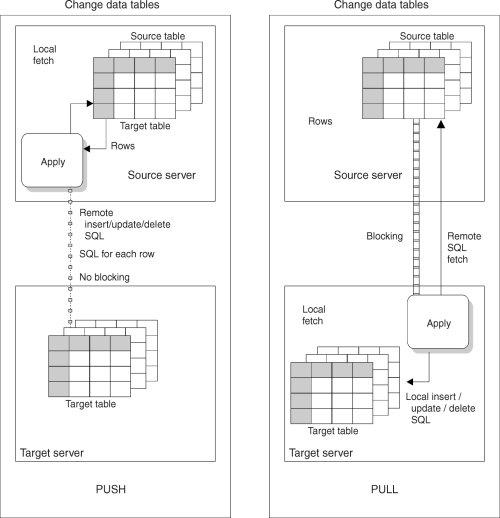
The pull versus push configuration is a question of where the Apply program is running: at the source server or the target server. In the push method, the Apply program runs at the source server. In the pull method, the Apply program runs at the target server. The level of granularity is at the replication subscription level; one Apply program could be pushing for some replication subscriptions and pulling for others.
When the Apply program processes a replication subscription, it first connects to the source server to fetch the current changed data. This data is fetched into a spill file that is local to the Apply program. After the data is retrieved, the Apply program connects to the target server and applies the changes, one row at a time, as an INSERT, UPDATE, or DELETE to each target table.
Figure 7 shows the difference between push and pull modes.
Figure 7. Push Versus Pull Mode
|
In pull mode, the Apply program connects to the remote source server to retrieve the data. DB2 can then use block fetch to pass the data across the network efficiently. When all data has been retrieved, the Apply program connects locally to the target server and applies the changes to the target table. The row-by-row process occurs as a local operation.
In push mode, the Apply program connects to the local source server and retrieves the data. Then it connects to the remote target server and pushes the updates to the target table. The row-by-row process occurs as a remote operation, with no blocking for network efficiency.
You do not have to do any special configuration to set up a push or pull configuration, except decide where to run the Apply program. The replication components and the Control Center recognize both configurations. The Control Center automatically sets up the replication control tables so the Apply program can push or pull data.
Generally, a pull configuration performs better than a push configuration because it allows more efficient use of the network. However, under the following circumstances a push configuration is a better choice:
Many individual factors influence the throughput possible with IBM Replication. The most important factors include:
Given the complex set of variables involved, you cannot accurately predict the throughput that might be achievable in a given system. At the same time, a feasibility study would normally need to include some estimation of the potential throughput that is possible.
One way of looking at throughput estimation is to break it down into two parts (assumes a remote pull configuration):
A feasibility study normally includes some estimation of the potential throughput that is possible, and developing a prototype is recommended to verify the throughput in an environment that reflects production conditions.
(5) See the following sources for detailed performance measurements: