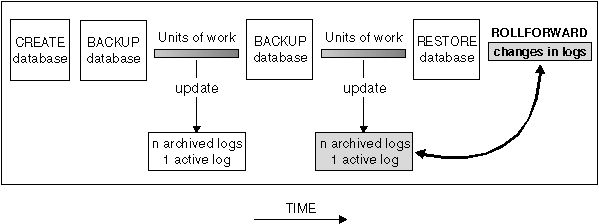

Roll-forward recovery using the BACKUP command in conjunction with the RESTORE and ROLLFORWARD commands puts the database or table space in a state that has been previously saved.
When you first create a database, only circular logging is enabled for it. This means that logs are re-used (in a circular fashion), and are not saved or archived. With circular logging, roll-forward recovery is not possible: only crash recovery or version recovery is enabled. When log archiving is performed, however, roll-forward recovery is possible, because the logs record changes to the database after the time that the backup was taken. You perform log archiving by activating either (or both) of the logretain and userexit database configuration parameters. When either of these parameters are enabled, the database is enabled for roll-forward recovery.
When the database is recoverable, you can perform backup, restore, and roll-forward recovery at both the database and the table space level. The backups of the database and table space can be online. Online restore and rollforward are also available at the table space level.
Roll-forward recovery re-applies the completed units of work recorded in the logs to the restored database, table space, or table spaces. You can specify that roll-forward recovery is to the end of the logs, or to a particular point in time.
Roll-forward recovery can follow the completion of a full database restore as described in "Restoring a Database". It can also be done with table spaces that are in a roll-forward pending state. For considerations on rolling forward a table space, see "Rolling Forward Changes in a Table Space"
For more information about the database configuration parameters associated with logging, see "Configuration Parameters for Database Logging".
Following are the backup considerations that apply when your database is enabled for forward recovery. For general information that applies to performing backups, refer to the following:
To enable a new database for roll-forward recovery, you must enable at least one of these configuration parameters before taking the first backup of the database. When you change the value of one or both parameters, the database will be put into the backup pending state, which requires that you take an offline backup of the database. After the backup operation completes successfully, the database can be used.
Under OS/2, you can also back up to diskette or to a user exit.
In OS/2, when you restore from a user exit and roll forward the database, the path to the database is the only reference used to locate the containers. Therefore, all the containers for that database that are on the backup tape are restored.
You can back up (and subsequently recover) part of a database by using the TABLESPACE option of the BACKUP command. This makes administering data, index, and long fields/large objects (LOBs) in separate table spaces easier.
If you want to be able to do forward recovery, you must regularly back up the database on the list of nodes, and you must have at least one backup of the rest of the nodes in the system (even those that do not contain user data for that database). Two situations require the backed-up image of a database partition at a database partition server that does not contain user data for the database:
The recovery history file is updated automatically with summary information whenever you carry out a backup or restore of a full database or table space. This file can be a useful tracking mechanism for restore activity within a database. This file is created in the same directory as the database configuration file. For more information on the recovery history file, see "Recovery History File Information".
In UNIX-based environments, the file name(s) created on disk will consist of a concatenation of the following information, separated by periods; on other platforms a four-level subdirectory tree is used:
   yyyy is the year (1995 to 9999)
   mm is the month (01 to 12)
   dd is the day of the month (01 to 31)
   hh is the hour (00 to 23)
   nn is the minutes (00 to 59)
   ss is the seconds (00 to 59)
Following are the restore considerations that apply when your database is enabled for forward recovery. For general information that applies to performing restores, refer to the following:
If you use ADSM and do not specify the TAKEN AT parameter, ADSM retrieves the latest backup copy.
Under OS/2, the backup copy of the database or table space could also be located on diskette or through a user exit.
Under Windows 95 and Windows NT, the backup copy of the database or table space could also be located on diskette.
When the ROLLFORWARD command is issued:
Another database RESTORE is not allowed when the roll-forward process is running.
Notes:
In a partitioned database system, if you intend to roll forward a table space (or table spaces) to the end of the logs, you do not have to restore it at each database partition (node). You only need to restore it at the database partitions that require recovery. If you intend to roll forward a table space to a point in time, you must restore the table space at each database partition before rolling forward.
Roll-forward recovery builds on a restored database and allows you to restore a database to a particular time that is after the time that the database backup was taken. This point can be either the end of the logs, or a point between the time of the database backup and the end of the logs.
You might use point-in-time recovery if an active or an archived log is not available. In this situation, you could roll forward to the point where the log is missing. You might also roll forward to a point in time if a bad transaction was run against the database. In this situation, you would restore the database, then roll forward to just before the time that the bad transaction was run.
Figure 31. Roll-Forward Recovery
|
You can also perform point-in-time roll-forward recovery on table spaces. For additional information, see "Rolling Forward Changes in a Table Space".
To use this method, the database must be configured to enable roll-forward recovery. Considerations for the database configuration file and database logs are presented in the following topics:
If you have tables that contain DATALINK columns, also see "Restoring Databases and Table Spaces and Rolling Forward to the End of the Logs" and "Restoring Databases and Table Spaces and Rolling Forward to a Point in Time".
The database configuration file contains parameters related to roll-forward recovery. The default parameters do not support this recovery, so if you plan to use it, you need to change some of these defaults. For additional information, see Chapter 20. "Configuring DB2".
A primary log, whether empty or full, requires the same amount of disk space. Thus, if you configure more logs than you need, you use disk space unnecessarily. If you configure too few logs, you can encounter a log-full condition. As you select the number of logs to configure, you must consider the size you make each log and whether your application can handle a log-full condition.
If you are enabling an existing database for roll-forward recovery, change the number of primary logs to the sum of the number of primary and secondary logs, plus 1. Additional information is logged for long varchar and LOB fields in a database enabled for roll-forward recovery.
When the primary log files become full, the secondary log files (of size logfilsiz) are allocated one at a time as needed, up to a maximum number as controlled by this parameter. An error code will be returned to the application, and activity against the database will be stopped, if more secondary log files are required than are allowed by this parameter.
See "Number of Secondary Log Files (logsecond)" for recommendations on how to use secondary logs.
The size of each primary log has a direct bearing on performance. When the database is configured to retain logs, each time a log is filled, a request is issued for allocation and initialization of a new log. Increasing the size of the log reduces the number of requests required to allocate and initialize new logs. (Keep in mind, however, that with a larger log size it takes more time to format each new log). The formatting of new logs is transparent to applications connected to the database so that database performance is unaffected by formatting.
Assuming that you have an application that keeps the database open to minimize the processing time to open a database (see "Recovery Performance Considerations"), the value for the log size should be determined by the amount of time it takes to make offline archived log copies.
The data transfer speed of the device you use to store offline archived logs, and the software used to make the copies, must at a minimum match the average rate at which the database manager writes data in the logs. If the transfer speed cannot keep up with new log data being generated, you may run out of disk space if logging activity continues for a sufficiently long period of time, determined by the amount of free disk space. If this happens, database processing will stop.
The data transfer speed is most significant when using tape or some optical medium. (Refer to Appendix L. "User Exit for Database Recovery" for information on using different media for storing logs.) Some tape devices require the same amount of time to copy a file, regardless of its size. You must determine the capability of your archiving device.
Additionally, tape devices have some unique considerations. The frequency of the archiving request is important. If the time for any copy operation is five minutes, the log size should be large enough to hold five minutes of log data during your peak work load. Also, the tape device may have design limits that restrict the number of operations per day. These factors must be considered when you determine the log size.
Minimizing log file loss is also an important consideration in setting the log size. Archiving takes an entire log. If you use a single large log, you increase the time between archiving. If the medium containing the log fails, some transaction information will probably be lost. Decreasing the log size increases the frequency of archiving but can reduce the amount of information loss in case of a media failure since the smaller logs before the one lost can be used.
Buffering the log records will result in more efficient logging file I/O, because the log records will be written to disk less frequently and more log records will be written at each time.
This grouping of commits will only occur when the value of this parameter is greater than 1, and when the number of applications connected to the database is greater than the value of this parameter. When commit grouping is being performed, application commit requests are held until the earlier of either one second elapsing or the number of commit requests equals the value of this parameter.
Because you can change the log path location, the logs needed for roll-forward recovery may exist in different directories or on different devices. You can change this configuration parameter during the roll-forward process to allow you to access logs in multiple locations.
The change to the value of newlogpath will not be applied until the database is in a consistent state. A database configuration parameter indicates the status of the database. See "Database is Consistent (database_consistent)" for additional information about this status indicator. See "Considerations for Managing Log Files" for information about the roles database logs play if a database is not in a consistent state.
Using this parameter means that the circular logging, that is the default, is being overridden.
Using this parameter means that the circular logging, that is the default, is being overridden. Userexit implies logretain but the reverse is not true.
See Appendix L. "User Exit for Database Recovery", for information about the user exit program.
The active log path is important when using either the userexit configuration parameter or the logretain configuration parameter to allow roll-forward recovery. When the userexit configuration parameter is set, the user exit is called to archive log files away from the active log path. When the logretain configuration parameter is set, this ensures that the log files remain in the active log path. The active log path is determined either by the Path to Log Files or Changed Path to Log Files (newlogpath).
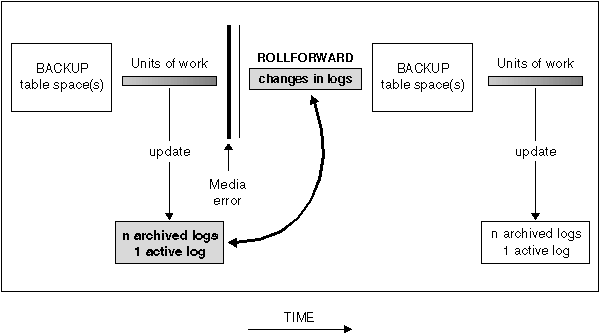
If the database is enabled for forward recovery, you have the option of backing up, restoring, and rolling forward table spaces instead of using the entire database. You may want to implement a recovery strategy for individual table spaces because this can save time: it takes less time to recover a portion of the database than it does to recover the entire database. For example, if a disk is bad and it only contains one table space, the table space can be restored and rolled forward without having to recover the entire database (and without impacting user access to the rest of the database). Also, table-space-level backups allow you to back up critical portions of the database more frequently than other portions, which requires less time than backing up the entire database.
If, in a partitioned database environment, some database partitions are in the roll-forward pending state, and, on other database partitions, some table spaces are in the roll-forward pending state (but the database partition is not), you must first roll forward the database partitions, then roll forward the table spaces.
If the data and long objects of a table are in separate table spaces, and the table has been reorganized, the table spaces for both the data and long objects must be restored and rolled forward together. You should take a back up of the affected table spaces after the table is reorganized.
Different states are associated with a table space to indicate its current status:
The table space could also be in the roll-forward-in-progress state if the roll forward operation did not complete, or AND STOP was not specified for the operation.
After a table space is restored, it is always in the roll-forward pending state (that is, if you restore a table space and specify the WITHOUT ROLLING FORWARD parameter, the WITHOUT ROLLING FORWARD is ignored). To make the table space usable, you must perform roll-forward recovery on it. You have the option of rolling forward to the end of the logs, or rolling forward to a point in time. If you want to roll forward a table space to a point in time, you should be aware of the following:
| Note: | You cannot do this if the backup image was taken online. In this situation you must roll forward to at least the end of the backup. |
Because the recovered table space must be consistent with the system catalog tables, you cannot perform a table space roll forward to recover a dropped table space or table, because the catalog table will indicate that the object was previously dropped. This means that you should not create dummy tables in those table spaces that you want to recover separately from the database.
You should roll forward both table spaces to the same point in time. If you do not, the summary table is placed in the check pending state at the end of the roll-forward operation.
You should find a point in time to stop rolling forward that will prevent this from happening.
Database                               Time of roll forward of     Restore
backup.                                table space TABSP1 to       database.
                                       T2. Back up TABSP1.         Roll forward
                                                                   to end of logs.
T1                T2                   T3                          T4
|                 |                    |                           |
|                 |                    |                           |
|--------------------------------------------------------------------------------
                  | Logs are not
                    applied to TABSP1
                    between T2 and T3
                    when it is rolled
                    forward to T2.
In the preceding example, you back up the database at time T1. Then, at time T3, you roll forward table space TABSP1 to the point in time T2, then take a back up of the table space after T3. (Because the table space is in the backup pending state, you must take a backup of it. The timestamp of the table space backup is after T3, but the table space is at time T2. Log records are not applied to TABSP1 from between T2 and T3.) At time T4, you restore the database with the backup you took at T1 and roll forward to the end of the logs. The table space TABSP1 will be placed into the restore pending state when time T3 is reached.
The table space is put into the restore pending state at T3 because the database manager assumes that operations were performed on TABSP1 between T3 and T4 without the log changes between T2 and T3 having been applied to the table space. If the log changes between T2 and T3 were reapplied as part of the ROLLFORWARD on the database, this assumption would be violated. The required backup of a table space that must be taken after it is rolled forward to a point in time allows you to roll that table space forward past a previous point-in-time roll forward (T3 in the example).
Assuming that you want to recover table space TABSP1 to T4, you would restore the table space from a backup that was taken after T3 (either the required backup, or a later one) then roll forward TABSP1 to the end of the logs.
In the preceding example, the most efficient way of restoring the database to time T4 would be to perform the required steps in the following order. Because you restore the table space before rolling forward the database, resource is not used to apply log records to the table space when the database is rolled forward, which would happen if you rolled forward the database before you restored the table space.
If you cannot find back up image of TABSP1 that is after time T3, or you want to restore TABSP1 to T3 or before, you can:
In a partitioned database environment you must roll forward all portions of the table space to the same point in time at the same time. This ensures that the table space is consistent across database partitions.
Before using the ROLLFORWARD command you should consider the following items:
If you perform end-of-log forward recovery, the QUERY STATUS can indicate that a log file (or files) is missing if the point in time returned by QUERY STATUS is earlier than you expect.
If you perform point-in-time forward recovery, the QUERY STATUS will help you ensure that the roll forward is to the correct point.
Figure 32. Table Space Roll-forward Recovery
 |
If you use ROLLFORWARD CANCEL against a database, this places the database into the restore pending state, whether or not a roll forward is in progress against the database.
ROLLFORWARD CANCEL behavior for table spaces is as follows:
| Note: | If no table space list is specified, SQL4906 is issued. |
| Note: | You cannot use ROLLFORWARD CANCEL to cancel a roll-forward operation that is running. You can only use it to cancel a roll-forward operation that completed but did not have ROLLFORWARD STOP issued for it, or for a roll-forward operation that failed before completing. |
If you have tables that contain DATALINK columns, also see "Restore and Rollforward Utility Considerations".
There are a number of considerations before invoking the ROLLFORWARD command:
Notes:
The DB2LOADREC environment variable is used to identify the file with the load copy location information. This file is used during roll-forward recovery to locate the load copy. It has information on:
If the location file does not exist or no matching entry is found in the file, the information from the log record is used.
The information in the file may be overwritten before the roll-forward recovery takes place.
Notes:
The following information is provided in the location file. The first five parameters must have valid values and are used to identify the load copy. The entire structure is repeated for each load copy recorded. For example:
TIMestamp      19950725182542         * Timestamp generated at load time
SCHema         PAYROLL                * Schema of table loaded
TABlename      EMPLOYEES              * Table name
DATabasename   DBT                    * Database name
DB2instance    TORONTO                * DB2INSTANCE
BUFfernumber   NULL                   * Number of buffers to be used for recovery
SESsionnumber  NULL                   * Number of sessions to be used for recovery
TYPeofmedia    L                      * Type of media - L for local device
                                                        A for ADSM
                                                        O for other vendors
LOCationnumber 3                      * Number of locations
   ENTry       /u/toronto/dbt.payroll.employes.001
   ENT         /u/toronto/dbt.payroll.employes.002
   ENT         /dev/rmt0
TIM            19950725192054
SCH            PAYROLL
TAB            DEPT
DAT            DBT
DB2            TORONTO
SES            NULL
BUF            NULL
TYP            A
TIM            19940325192054
SCH            PAYROLL
TAB            DEPT
DAT            DBT
DB2            TORONTO
SES            NULL
BUF            NULL
TYP            O
SHRlib         /@sys/lib/backup_vendor.a
Notes:
| Note: | If you run LOAD COPY NO and do not take a backup copy of the database or affected table spaces after running LOAD, you cannot restore the database or table spaces to a point in time after the LOAD was performed. That is, you cannot use roll-forward recovery to rebuild the database or table spaces to a state after the LOAD. You can only restore the database or table spaces to a point in time that precedes the LOAD. |
If you want to use a particular load copy, the LOAD timestamps are recorded in the recovery history file for the database. In a partitioned database environment, the recovery history file is local to each database partition.
For more information on LOAD, see "Using the LOAD Utility".
There are items to be considered when managing database logs:
When the roll-forward recovery method completes successfully, the last log is truncated, and logging begins with the next sequential log. The practical effect is that any log in the log path directory with a sequence number greater than the last log used for roll-forward recovery is re-used. You should keep a copy of the logs elsewhere if you want to be able to re-execute the ROLLFORWARD command using these old logs. (You may use a user exit program to copy the logs to another location.)
You can have duplicate names for different logs because:
The database manager ensures that an incorrect log is not applied during roll-forward recovery, but it cannot detect the location of the required log. You must ensure that the correct logs are available for roll-forward recovery.
If you are rolling forward changes in a database or table space and the roll-forward operation cannot find the next log, the log name is returned in the SQLCA, indicating the next log file needed, and roll-forward recovery stops. At this time, if there are no more logs available, you can use the ROLLFORWARD command to stop processing.
If you terminate the roll-forward recovery (by specifying the STOP option on the ROLLFORWARD command) and the log containing the completion of a transaction has not been applied to the database or table space, the incomplete transaction will be rolled back to ensure that the database or table space is left in a consistent state.
Figure 33. Reusing Log File Names
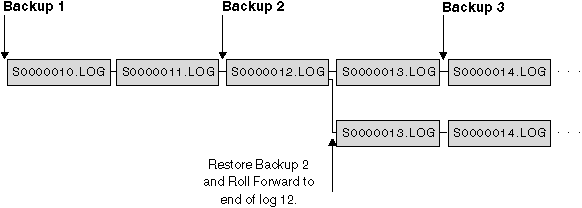 |
In the diagram above, assume that a table space backup, Backup 3, is completed between S0000013.LOG and S0000014.LOG in the top log sequence. If we restored and rolled forward using database Backup 2, we would need to roll-forward through S0000012.LOG. After this we could continue to roll-forward through either the top log sequence or the newer bottom log sequence. If we rolled forward through the bottom sequence, we would not be able to use the table space Backup 3 to do a table space restore and roll-forward recovery.
To be able to complete a table space roll-forward to end of logs using the table space Backup 3, we would have to restore using database Backup 2 and then roll-forward using the top log sequence. Once the table space Backup 3 has been restored, you can then request a roll-forward to end of logs.
| Note: | The special register, CURRENT TIMEZONE, holds the difference between CUT and the local time at the application server database. Local time is the CUT plus the current timezone contents. |
When the roll-forward processing completes, the log file with the last committed transaction is truncated, and logging begins with the next sequential log. If you do not have a copy of the log before it was truncated and those with higher sequence numbers, you cannot recover the database past the specified point-in-time. (Once normal database activity occurs following the roll-forward, new logs are created which can then be used in any subsequent recovery.)
This backup must be made even if the subdirectory contained empty logs.
You may encounter a situation similar to the following: You would like to do a point-in-time recovery on a full database but you are concerned that you might lose a log during the recovery process. (This scenario could occur if you have an extended number of archived logs between the time of the last backup database image and the point-in-time where you would like to have the database recovered.)
First, you should copy all of the applicable logs to a "safe" location. Then you can run the RESTORE command and use the roll-forward recovery method to the point-in-time you wish for the database. If any of the logs that you need is damaged or lost during this process, you have a backup copy of all of the logs elsewhere.