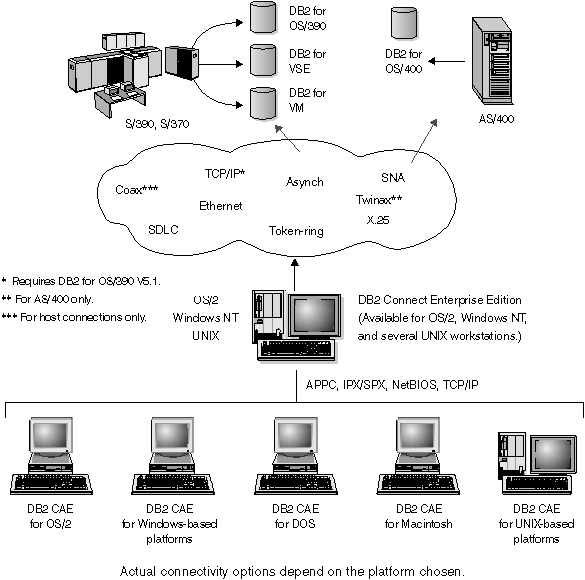

Figure 6 illustrates IBM's solution for environments in which you want to use a DB2 Client Application Enabler making an indirect connection to a DRDA host through DB2 Connect Enterprise Edition server.
All DB2 and DB2 Connect products include a Client Application Enabler component. In addition, Client Application Enablers for AIX, DOS, HP-UX, Macintosh, OS/2, SCO Unix Ware, Silicon Graphics, SINIX, Solaris, and Windows 32-bit operating systems are provided on separate CD-ROMs with all DB2 products except the Personal Edition versions.
This type of connectivity is most appropriate for environments where large numbers of workstations need well-managed, secure access to host and AS/400 databases. It allows database administrators to concentrate all access to host data through one or more DB2 Connect servers.
This type of a configuration is required for supporting applications that exploit transaction monitors (e.g. CICS, Encina, Tuxedo) as well as applications that are implemented as Java applets. This configuration is also the right choice for multi-tier applications for both traditional client-server as well as web application server environments.
Although the DB2 Connect EE Server is often installed in an intermediate server machine to connect the DB2 CAE clients to the host, it is also installed in machines where multiple local users want to access the host or AS/400 servers directly. For example, the DB2 Connect EE may be installed in a large UNIX machine with many local users. It may also be installed in a large NT or UNIX Web server, TP monitor, or other 3-tier application server machine with multiple local SQL applicaton processes/threads. In these cases, you can choose to install DB2 Connect EE in the same machine for simplicity, or in a separate machine to off-load the CPU cycle.
Figure 6. Indirect Connection to DRDA Host via DB2 Connect Enterprise Edition