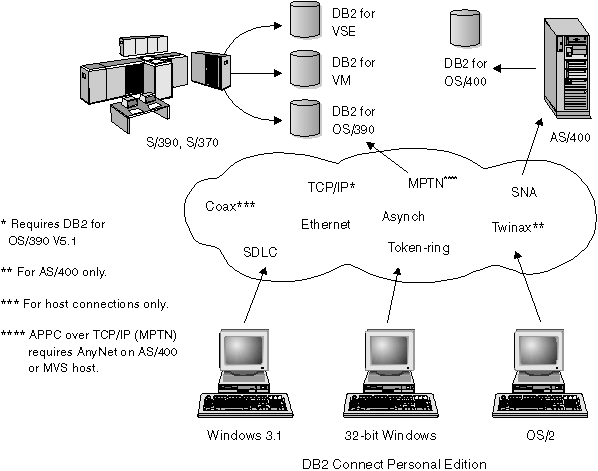

Direct connection without intermediate gateways and servers is a very convenient and desirable configuration. This is especially true for situations where the host or the AS/400 database supports TCP/IP connectivity (for example, DB2 for OS/390 V5.1 or later, or OS/400 V4 Release 2). In such a configuration, each DB2 Connect workstation establishes a direct TCP/IP connection to DB2 for OS/390 or, using the Integrated SNA Support, connects via APPC to DB2 for MVS and other host and AS/400 databases.
TCP/IP connectivity requires that the host database support TCP/IP. At this point, DB2 for OS/390 V5.1, DB2/400 V4R2, and DB2 for VM V6.1 support native TCP/IP connections. An alternative to native TCP/IP is MPTN connectivity. MPTN connections require that IBM AnyNet products be installed on the target database system, but does not require the host database to provide native TCP/IP support.
Figure 4 shows workstations directly connected to a DRDA host. Each workstation has DB2 Connect Personal Edition installed.
Figure 4. Direct Connection Between DB2 Connect and a DRDA Host
In this environment, if you are using Windows 32-bit operating systems, you can use the DB2 Connect Personal Edition Integrated SNA Support to connect directly to the host servers. DB2 Connect Integrated SNA Support permits connections over a variety of local and wide area networks, such as Token-Ring, Ethernet, SDLC, Twinax, Coax and Asynchronous dial-up. The DB2 Connect Integrated SNA Support implements both APPC and MPTN connections over networks using hosts and AS/400 systems that have IBM AnyNet products installed. Users of OS/2 workstations can use IBM Personal Communications for OS/2. IBM Communications Manager V1.11, or IBM Communications Server for OS/2 to achieve direct APPC and MPTN connectivity.